OSPFの認証とは
OSPF(Open Shortest Path First)でネイバー間の通信を安全にするために、認証を設定することができます。OSPFには、ヌル(None)、平文、およびMD5の3つの認証方式があります。
- ヌル認証(デフォルト): 認証が無効で、認証情報なしで通信が行われます。
- 平文: クリアテキストのパスワードを使用する方式で、セキュリティは低めです。
- MD5認証: パスワードを暗号化してやり取りする、最も安全な方式です。
認証を設定する際は、同じネットワークセグメント内のすべてのルータで、同じパスワードと認証方式を使用する必要があります。
インターフェイス認証
インターフェイスでの認証は以下のコマンドで設定します。
平文認証
Router(config)#interface interface-id
Router(config-if)# ip ospf authentication
Router(config-if)# ip ospf authentication-key password
MD5認証
Router(config)#interface interface-id
Router(config-if)# ip ospf authentication message-digest
Router(config-if)# ip ospf message-digest-key key-id md5 password
設定例

R2とR3のネイバーでの平文認証
R2(config)#interface GigabitEthernet 0/3
R2(config-if)#ip ospf authentication
R2(config-if)#ip ospf authentication-key test
R3(config)#interface GigabitEthernet 0/2
R3(config-if)#ip ospf authentication
R3(config-if)#ip ospf authentication-key test
パケットキャプチャを確認するとOSPFのヘッダーにtestという文字が格納されていることが分かります。

R3とR4にネイバーでのMD5認証
R3(config)#interface GigabitEthernet 0/4
R3(config-if)#ip ospf authentication message-digest
R3(config-if)#ip ospf message-digest-key 1 md5 test
R4(config)#interface GigabitEthernet 0/3
R4(config-if)#ip ospf authentication message-digest
R4(config-if)#ip ospf message-digest-key 1 md5 test
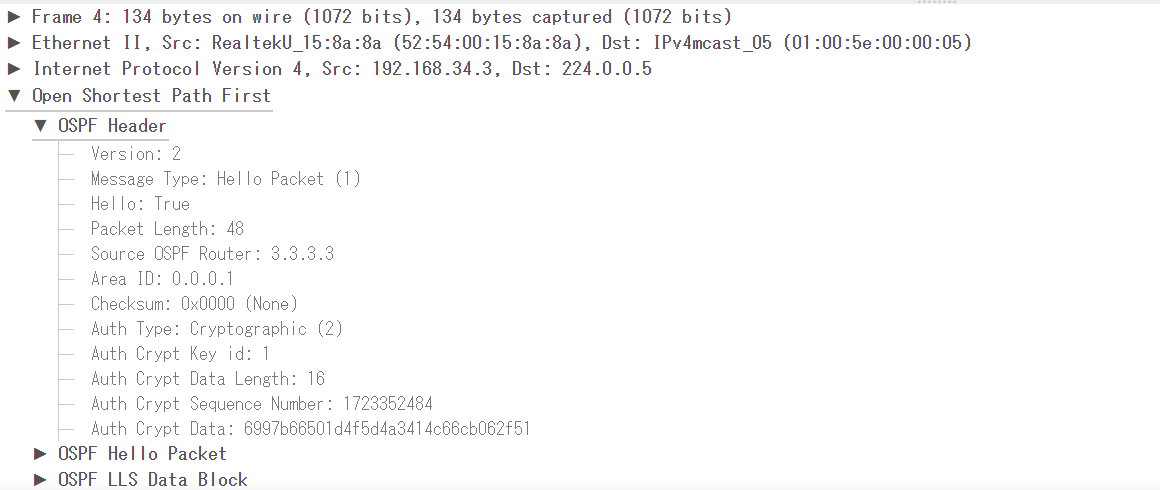
パケットキャプチャを確認すると暗号化された状態でOSPFのヘッダーに格納されていることが分かります。
エリア認証
エリアでの認証は以下のコマンドで設定します。
平文認証
Router(config)# router ospf process-id
Router(config-router)# area area-id authentication
Router(config)#interface interface-id
Router(config-if)# ip ospf authentication-key password
MD5認証
Router(config)# router ospf process-id
Router(config-router)# area area-id authentication message-digest
Router(config)#interface interface-id
Router(config-if)# ip ospf message-digest-key key-id md5 password
設定例
エリア0での平文認証
R1(config)#router ospf 1
R1(config-router)#area 0 authentication
R1(config-router)#exit
R1(config)#interface GigabitEthernet 0/2
R1(config-if)#ip ospf authentication-key test
R2(config)#router ospf 1
R2(config-router)#area 0 authentication
R2(config-router)#exit
R2(config)#interface GigabitEthernet 0/1
R2(config-if)#ip ospf authentication-key test
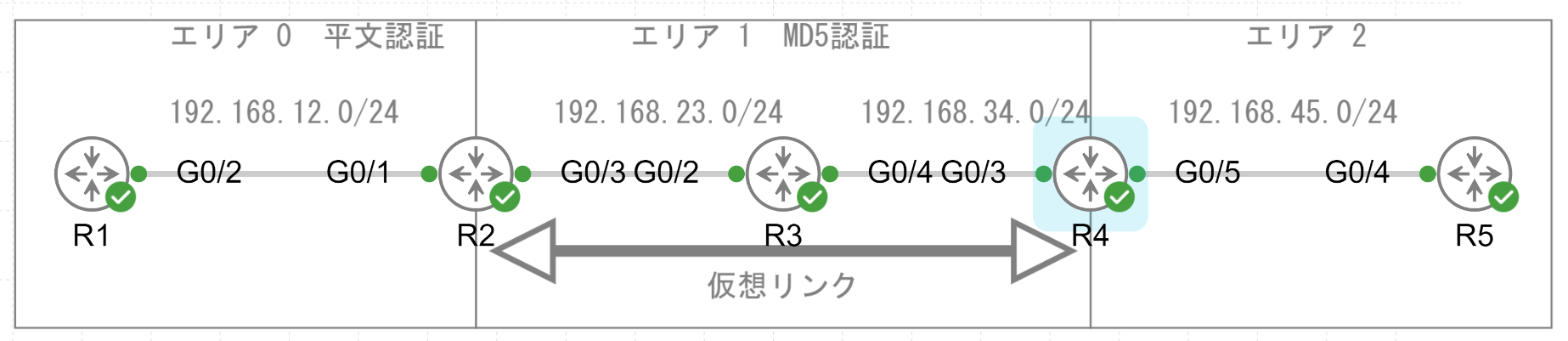
R2でエリア0の認証を設定すると自動的に仮想リンクでも認証設定が有効化されてしまうので、ネイバーがダウンしてしまいます。
*Aug 11 05:20:34.364: %OSPF-5-ADJCHG: Process 1, Nbr 4.4.4.4 on OSPF_VL0 from FULL to DOWN, Neighbor Down: Dead timer expired
R4でもエリア認証が必要となります。
R4(config)#router ospf 1
R4(config-router)#area 0 authentication
エリア1でのMD5認証
R2(config)#router ospf 1
R2(config-router)#area 1 authentication message-digest
R2(config-router)#exit
R2(config)#interface GigabitEthernet 0/3
R2(config-if)#ip ospf message-digest-key 1 md5 test23
R3(config)#router ospf 1
R3(config-router)#area 1 authentication message-digest
R3(config-router)#exit
R3(config)#interface GigabitEthernet 0/2
R3(config-if)#ip ospf message-digest-key 1 md5 test23
R3(config-if)#exit
R3(config)#interface GigabitEthernet 0/4
R3(config-if)#ip ospf message-digest-key 1 md5 test34
R4(config)#router ospf 1
R4(config-router)#area 1 authentication message-digest
R4(config-router)#exit
R4(config)#interface GigabitEthernet 0/3
R4(config-if)#ip ospf message-digest-key 1 md5 test34
仮想リンク認証
仮想リンクでの認証は以下のコマンドで設定します。
平文認証
Router(config)# router ospf process-id
Router(config-router)# area area-id virtual-link router-id authentication
Router(config-router)# area area-id virtual-link router-id authentication-key password
MD5認証
Router(config)# router ospf process-id
Router(config-router)# area area-id virtual-link router-id authentication message-digest
Router(config-router)# area area-id virtual-link router-id message-digest-key key-id md5 password
設定例

R2とR4の仮想リンク間でMD5認証
R2(config)#router ospf 1
R2(config-router)#area 1 virtual-link 4.4.4.4 authentication message-digest
R2(config-router)#area 1 virtual-link 4.4.4.4 message-digest-key 1 md5 test24
R4(config)#router ospf 1
R4(config-router)#area 1 virtual-link 2.2.2.2 authentication message-digest
R4(config-router)#area 1 virtual-link 2.2.2.2 message-digest-key 1 md5 test24